Pages

Wednesday, June 13, 2012

Call block: Android app to block calls and sms

call bocker,sma blocker,android appCall Block application is that you can choose to block phone calls on android. Call block is a full-featured application to block phone calls and SMS. How to perform this blocking method, you can stop the calls or SMS from the same number. This application will help you properly to avoid distractions when you're working, meeting, driving, or break.

There are no settings that are difficult or cumbersome in applications call block. This application offers you the main design of the dynamic, so with it you can find out the mode to block rather than go into settings.
In addition, the application also offers four modes of blocks, dynamic interface will change automatically, so that you can identify active mode easily. Block Mode available: Block all, Block blacklist only, Thanks
Whitelist only, accept contact only.

This application also provides 4 mode i.e. penjawabm off Power, busy, No service and this number is not in service. There is also a switch to change mode menu blocking and non-blocking mode directly without having to go into the settings menu.

Tuesday, June 12, 2012

The Secret codes for Android Smartphone


Secret codes for Android Smartphone is partly reset some data or even reset the whole data stored on the Mobilephone Android, so before using please read carefully its use. The Following Android Secret Codes:

Code to perform a variety of tests on components of the Android phones:
  • * # * # 0 * # * # * → LCD test
  • * * # 2663 # * # * → touchscreen version
  • * # * # 0283 # * # * → Loopback packet
  • * # * # 0673 # * # * or * # * # * # 0289 # Melody test → *
  • * # * # 0842 # * # * → test Device (vibration, and Backlight test)
  • * # * # * # 2664 * → touchscreen test
  • * # * # 0588 # * # * → proximity sensor test
  • * # * # * # * # 3264 → version RAM
Displays The GTalk Service Monitor
  • *#*#8255#*#*
Test WLAN, GPS and Bluetooth
  • * # * # * # * # 526 → WLAN test
  • * # * # 232338 # * # * → Displays the MAC address of WiFi
  • * # * # 1472365 # * # * → GPS test
  • * # * # 232331 # * # * → Bluetooth test
  • * # * # 232337 # * # → Display Bluetooth address
Code to get the firmware version information:
  • * # * # 4986 * 2650468 # * # * → PDA, phone, H/W, RFCallDate
  • * # * # 1234 # * # * → PDA and phone
  • * # * # 1111 # * # * → FTA BD Version
  • * # * # 2222 # * # * → FTA HW Version
  • * # * # 44336 # * # * → PDA, phone, CSC, build time, numbered list changes.
Code reset (delete) data to the origin (Soft Reset)
  • *#*#7780#*#*
The code to format the phone to original settings (Hard Reset)
  • *2767*3855#
Displays information about the phone and battery
  • *#*#4636#*#*
The code provides information about camera phones
  • *#*#34971539#*#*


Easy Way How to partition the SD Card Android


android setting,android sd card,parttion android sd cardOn the existence of an Android smartphone SD Card can be said quite vital. Limited internal memory smartphones Android requires us to add external memory to store a variety of data ranging from the essential to the mere entertainment data. It looks like it does the hard drive on a PC, a grouping of memory to specific files are necessary to facilitate the following organizing important data on the Android's memory. Unfortunately Android smartphone to date is only capable of supporting a single external memory slot. As the solution so it can be done the way partition SD Card Android.

To partition the SD Card Android takes a pem software-partition at this writing we chose "Mini Tool Partition Wizard". This is a windows software that can be downloaded for free at partitionwizard.
Then install the software on the computer PAL.

HOW TO PARTITION THE SD CARD ANDROID THROUGH PC
1. remove the SD Card from Android smartphone, then connect it to your PC using a Card Reader or if using a Laptop live input slot SD Card to Laptop.

2. wait until the SD Card unreadable. Next backup all existing data on the SD Card (Copy it to a folder on an SD Card). The process of partition would mengabitkan SD Card ter-format and causes all data will be lost.

3. launch Partition Wizard software Mini Tool. Then right click on the SD Card, select "Delete" make sure the SD Card is in a State of "Unallocated"

4. Select "Create Partition". Adjust the appropriate partition capacity allocation needs a PAL. Suppose that PAL has a SD Card capacity of 8 GB and want to partition into two parts each 6 GB and 2 GB. 6 GB as Logical (to store data) and the remaining 2 GB as Primary (for File System).
On the "Create content" As "Primary"
On the "File System" content "FAT32"
In the "Partition Size" contents "2000 MB"
Click "OK"
The first partition for File System completed

5. next create a second partition for the data. Select The "Create Partition".
On the "Create content" As "Logical"
On the "File System" content "EXT2"
On "Cluster Size" contents "4 KB"
In the "Partition Size" contents "6000 MB"
Click "Apply" at the top left of the

6. wait a few moments and the SD Card PAL has been partitioned.

How to Android GPS App Setting

Setting GPS applications Android -smartphone with a wide array of Neutrals features sophisticated GPS applications is something that almost always there on any smartphones, as well as with the Android smartphone. Some time this GPS became popular used by the Indonesia (especially urban communities), ease of access to information navigation towards a place be the reason people use GPS. Nowadays almost every car has a navigation devices (GPS). Then for us-we who do not have the GPS is how? Calm down PAL can leverage Android smartphone PAL as GPS. PAL live Android GPS apps that are currently available. Following further reviews from us:

Android GPS,GPS App,GPS Setting,gps app setting,Android GPS App setting
Android GPS app can be divided into two types based on the data retrieval process. The first is the Android GPS app Online. To be able to access the data the user navigation requires an internet connection. The application will retrieve data navigation on certain servers via the internet and then display it to the user. The second type is the Android GPS app Offline, which, when using this application we don't require an internet connection, since all the necessary navigation data has been downloaded and stored in the memory of our Android smartphone. From this explanation surely it would be more fun to use the Android GPS app offline, since it can save bandwidth usage of the internet is expensive. However, keep in mind these two equally require a connection to the operator network via satellite.

Android GPS app we recommend is Google Maps Navigation
By default (default) Android Operating System already includes the application Google Maps on it. To be able to run Google Maps Android GPS app and or other we need to activate the GPS feature on our smartphones. Here are the steps:
Setting Up The Android GPS App
  1. go to the "Homescreen" via the button "Home".
  2. after having been in the "Homescreen" press the button "Menu"
  3. Select "settings" and then "Location"
  4. then PAL will be on view "My Location". There are two options "Use Wireless Network and" Use GPS Satellite "
  5. the "Use Wireless Networks" will use GPS based on Wi-Fi networks and BTS. While the "Use GPS Satellite" will use GPS based on the signal from the satellite. The second option will give you GPS data which is more than the akurate "Use Wireless Networks" but unfortunately more wasteful batteries.
  6. Please select which is the best pal for PAL or can also activate both of them, but of course the battery would be drained.
Nah get here matey Android GPS has been activated. Now PAL can run Android GPS app that PAL had. In the next post we will give you the option to download the Android GPS app Offline. So Setting The Android GPS App.

Android Smartphone Battery life


Vendor communication devices from China, Huawei first semester this year again adorn the smart phone market by introducing a series of Ascend.

The series provided the Huawei Ascend Ascend P1, Huawei Ascend G300, and Huawei Ascend Y200. Huawei Ascend series rely on P1 in Indonesia with the aim market premium class. Android smart phone series, this puts the phone with ICS kerampingan-dimensional body, 7 mm 69mm X 64,8 X 129 mm.

Smart phones Dual Core 1.5 GHz TI OMAP it comes with super AMOLED screen 4.3 inches and 8 MP camera. "We have launched a device that fits in Indonesia namely in terms of features, price and its forms," said Legi Soegianto, Senior Product Manager Device Dept. Indonesia Rep. Office in the Tower Scheme, Huawei, Monday 4 June 2012.

In addition to the P1 series, Huawei also supplement with Huawei Ascend G300 Series with dimensions 10, 5 mm X 63mm X 122,5 mm. 4 inches WVGA touchscreen equipped Android Gingerbread, 1 GHz Qualcomm, battery 1350 mAh, and the camera 5 MP.

Additional features in this series i.e. connection HDMI, MHL and dual microphone. Huawei provides support for mobility work with applications power point and PDF documents. This Smartphone also supports the connection with DLNA devices.

Huawei Ascend Y200 series comes with dimensions of 11.7 mm X 60.4 mm X 116,9 mm, and a 3.5 inches HVGA screen. Smartphone bargains in this series supported Android 2.3 (Gingerbread), 800 MHz Qualcomm processor and battery, 1250/1400 mAh.

Battery Saving
As a pioneer in the energy saving battery, Legi said Huawei will continue to develop so that the savings of the maximum. Third, in his smart phone also adopted the technology that mendepankan the battery savings.

"Much to the chagrin of battery power on your smartphone. We present an efficient battery technology, "he added. In the future, the battery savings will be combined with a battery saving technology supported from explosives. As a result, the savings would be the maximum.

Legi says in regular use for browsing, gaming and social network, the series P1 is able to be used within 1 to 2 days. P1 series already present in several countries in Europe, America. P1 will be present in Indonesia in the near future. Source: Vivanews

Monday, September 12, 2011

5 ancestors of Gadget Android

Android is now a popular mobile phone operating system. Look at it, a lot of people then the tares by wearing a green robot-based smartphone. Google's Android was introduced for the first time in 2007. After that, some vendors are starting to introduce Android handset products.

Just flashback, following the model of the first Android phone from several leading vendors, such as Sniper Techno take from a variety of sources:

1. HTC DREAM
first Android phone,screen full qwerty keyboard and sliderHTC Dream or also known as the HTC G1, the first Android phone is coming into the market. The Handset's release of the first in the United States and the United Kingdom in 2008. His form was quite interesting with screen full qwerty keyboard and slider. The Android version is still version 1.6. The processor still 528 MHz. This marks the debut of Android Handsets that it later flourished in a short time.


2. MOTOROLA CLIQ
handset business,first Android phoneMotorola's handset business efforts before adopting the Android. They also launched the Cliq in 2009 as its first Android phone. Android-based handset this Cupcake, 528 MHz processor powered Motorola Cliq enough reap success and become a foothold for the next Motorola handset's success, most notably the Motorola Droid series.


3. SAMSUNG GALAXY I7500
first Android handset,samsung Full touchscreen,samsung AMOLED Handset Samsung is known to adopt many operating system certainly does not want to Miss put on Android. The band released its first Android handset, the Galaxy i7500 in June 2009. Full touchscreen AMOLED Handset is indeed not so successful. However its presence marks the progress of Samsung increasingly reaping great success until the Android at the moment.


4. LG GW620
first LG Android,Android smartphones,touch screen qwerty keyboardNovember 2009 marks the debut of the first LG Android in the world. South Korea from this Vendor released the LG GW620 Android phone is a touch screen qwerty keyboard equipped slider. ER even touch screen resistive still. Just like Android smartphones, processors 528 MHz, still far from Android today.


5. SONY ERICSSON XPERIA X 10
SONY ERICSSON XPERIA X 10,Android phonesThe Xperia X 10 was first introduced in November 2009. Its specifications are quite advanced with a 1 GHz processor and 8 megapixel camera. This Handset is quite successful on the market. Now even though the brand Sony Ericsson has not been forwarded, Sony still continue the progress on the problem of Android phones and still bears the name Xperia.

Friday, August 12, 2011

The Development of Android OS Version from time to time

The development version of Android OS -In a previous post we have discussed about the history of the Android OS that discusses about the background to the creation of a sophisticated operating system based on open source Linux. Since the early diakuisisinya Android Inc. by Google has created several versions of Android are named alphabetically from the first version named Astro, then version 1.5 starts with the name of dinami desserts (dessert), i.e. the most recent Cupcake to the current Ice Cream sandwiches. For PAL that penasarn like what the development version of the Android OS is from time to time, in this article we will create a special PAL presented it faithfully Androbana. But we recommend first read about PAL what is Android?. OK if it is just go ahead, let us refer to.

The Development Version of The Android OS
Android Beta
It was first released on November 5, 2007, then on November 12, 2007 Software Development Kit (SDK) was released by Google.

Android 1.0 (Astro)
android development,android os,android tablet,android first version,android version,android ice cream,android updated versions,android os version,versions of android
First released in Spetember 23 2008. In fact the first version of Android will be named with the name "Astro" but for reasons of copyright and trademark the name "Astro" not so pinned on the first version of the Android OS. The HTC Dream is the first mobile phone to use this OS. Following the appearance of the HTC Dream.

In this first version of android has already introduced the Android Market, the place to download a wide variety of applications and updates to Android. Then there are features of syncronisasi with a variety of other Google services such as Google Contact, Calendar, Maps, Talk, and more.

Android 1.1 (Bender)
First released on February 9, 2009. This second version of Android is also having problems naming the same with its first version. At first this will be an Android named "Bender" but for reasons violates the trademark, the name "Bender" is not so pinned on this Android version. Initially this version of Android OS devices released for T-Mobile G1. This version is an update to fix some bugs, to replace the FIRE and add some features. Following the appearance of the home screen of Android OS v.1.1.

Android 1.5 Cupcake
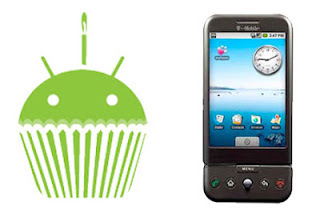
android development,android os,android tablet,android first version,android version,android ice cream,android updated versions,android os version,versions of androidIt was first released on April 30, 2009. Well, this Android version naming using the name eat dessert (dessert) began to be used, as this is the third version of the naming of beginning with the letter "C" and be a "Cupcake" became the official name of this third version of the Android OS. This OS based on Linux kernel 2.6.27 and added some updates as well as new UI from previous versions of Android. Start there is a "widget" that can reduce dibesar. Then added the ability to upload videos and pictures onto Youtube and Picasa.

Android 1.6 Donut
android development,android os,android tablet,android first version,android version,android ice cream,android updated versions,android os version,versions of androidWas first released on September 15, 2009. There is an increase in search features and the UI is more user friendly. This version also supports CDMA/EVDO technology, 802.1 x, VPNs. then support screen with resolution WVGA. The following Android v 1.6 Donut sightings.

Android 2.0/2.1 Enclair
Was first released on December 9, 2009. Place the addition of features to the optimization of hardware, improved Google Maps 3.1.2, change the browser UI with HTML5 support, new and new contact list, support flash for camera 3.2 MP, digital Zoom, and Bluetooth 2.1. Some versions of updates between Android v.2.0 then v 2.0.2 and final v. 2.1.

Android 2.2 (Froyo) Frozen Yogurt
First released on May 20, 2010 on the Google Nexus One smartphone. On this version is support for Adobe Flash Player 10.1. An increase in the speed of opening and closing applications, as well as the use of SD Card as storage applications. When the Android Froyo present began to appear a lot of discussion that discusses about the rivalry between Android and iOS to be increasingly strict in the days to come. Some updated versions were released, among others, the Android v. 2.2.1 to 2.2.3 v..

Android 2.3 Gingerbread
First introduced on December 6, 2010. Been a lot of improvement on the version of Android on this one compared to the previous version. Designed to memaksimalakan the ability of applications and games. As well as starting the use of Near Field Communication (NFC). Improvements to support Screen WXGA resolution and above. Some updated versions were released, among others, v. 2.3.3 to v. 2.3.7. Until recently the Android Gingerbread is Android version that has the most users compared to other Android series reached 65% of all Android versions are released.

Android Honeycomb 3.0/3.1
android development,android os,android tablet,android first version,android version,android ice cream,android updated versions,android os version,versions of android
First introduced on 22 February 2011 and Motorola Xoom is the first to use it. This version of Android is the OS that is designed specifically for use on tablet PC optimizers.

Android 4.0 Ice Cream Sandwiches
Until this article was written on the Android version of the ICS is most anyar. It was first released on October 19, 2011. The first Smartphone using the Android OS is Samsung Galaxy Nexus. In theory all mobile devices that use the previous version of Android, Gingerbread, you can update to Android Ice Cream sandwiches. However, most of the sayangnnya until now using the Android smartphone which is the ICS high-end-class smartphones were sold at prices quite expensive. Perhaps because of this reason the distribution version of Android on this one not more than 8% to pertangahn in 2012.The following diagram of distribution of Android OS based on his version.

That's the way the development of the Android Operating System from time to time. Although not even 4 years Android OS mobile phones on the market present but currently operating system-hosted by Google this is closer to the position of the iOS mobile operating system as a ruler in the world. So our writing about the development of the Android OS Version from time to time. Source: Vivanews